 ClientsOpportunities, quotes, product catalogue
 ProjectsPlanning, tasks, sign-off
 ServiceHelpdesk, tickets, retainers, assets
 TeamPeople, absence, time
 MoneyInvoices, e-invoicing, insights
 AgentsLeadtime Agent, your own agents, automation

Fracto Field: Leadtime for medical device service.
Inspections, faults from the inbox and service contracts, all the way to the invoice. Fracto Field is Leadtime set up for medical device service companies, sold and supported by Fracto.
What Fracto Field is
A special edition of Leadtime for our partner Fracto.
Fracto is a training platform for medical devices, for manufacturers, distributors and hospitals: courses from the manual, training at the device, proof per person. After the training comes the care, and that is what Fracto Field is for. It continues where the training platform leaves off and is still a product of its own: you can use it without a single course.
Technically, Fracto Field is Leadtime set up for medical device service. Fracto sells and supports it, and you sign in to Leadtime. The screens on this page therefore show Fracto’s logo, because in Leadtime every workspace sets its own logo. Lukas Ebner, managing director of Leadtime, co-founded Fracto, and Fracto itself runs on Leadtime.
Two products on one platform
The trainingCourses from the manual, training at the device, proof per person.
The careDevices at the customer, inspections, faults and service contracts, all the way to the invoice.
The platform underneath. You sign in to Leadtime.
Do you service devices or equipment in another industry? Leadtime itself covers that, with objects, helpdesk and allowances. More under Service
The problem
The device is delivered. The work has just begun.
Between commissioning and the end of a service contract lie years. Over that time every device needs electrical safety and metrological checks, maintenance to the manufacturer’s schedule and sometimes quick help. The due dates often live in a spreadsheet that one person keeps.
Faults arrive by email, to different addresses and often without a serial number. Nobody can see who is on it. Technicians are scheduled in Excel and Outlook, and the service report gets retyped.
How much of the service contract is used up only becomes clear when someone works it out. Jobs outside the contract slip through, and the invoice goes out weeks later.
What a head of service needs to know at any time
- Which inspections are due in the next 60 days?
- What last happened to this device?
- Who is handling this morning’s fault?
- How much of the service contract is already used?
In Fracto Field you see this on the device and on the contract.
What it looks like
Fracto Field in just under ten minutes, in the real app.
A medical device service company: master data and devices, framework contracts, dispatch and automations, then one job from email to invoice. Jump straight to the part you care about.
Video transcript
A medical device service company
Let us show you a typical service company for medical technology. With a network of technicians, it looks after hospitals across Germany: it carries out electrical safety and metrological checks, and handles repairs, commissioning and training. In most companies, this runs on Excel, Outlook and paper today. Assigning technicians, recording time, documentation: every break between tools costs time. We will show you how it all comes together in Fracto Field.
Master data
First, the master data. Fracto Field covers not just the customer list but the whole world of a service company: hospitals as customers, plus manufacturers, partners and suppliers, grouped by type. Let's open a customer. The overview sums up the key information: master data, contact details, and whether the hospital belongs to a group. Under “Members” you keep the contact people at the hospital. Contacts can also sync with the address book on your smartphone.
Devices
Under “Objects” are this customer's devices. In Fracto Field, objects are the things you look after, here medical devices, with type, status and serial number. Let's open a device. At the top: manufacturer, model and serial number. Below: the basic information and your own fields, for example inventory number, year of manufacture, device class, and the dates of the last and next electrical safety check. On the right are the tasks that have ever run on this device. When the hospital calls and says the ventilator in operating room three is acting up, you see all appointments, all technicians and all jobs of recent years at a glance. In the journal, the back office notes what does not belong in an inspection report: contract changes, a new contact at the customer, unusual incidents. And under “Files” you keep reports, inspection records, manuals and data sheets right on the device.
Framework contracts
Customer relationships are called projects in Fracto Field. There are one-off projects and ongoing projects. Ongoing projects map the framework contracts that are common in this industry. A framework contract holds the devices, the contacts, the contract documents, perhaps dedicated service teams, and above all the billing. You decide very flexibly how to bill. First: fixed price subscriptions, a monthly or yearly fee, for example for service availability. Second: variable subscriptions, billed per device under care. As the installed base grows, so does the invoice. Third: product subscriptions with included packages. A safety check package for ventilators, for example, includes two electrical safety checks per year. Alongside these, you agree support allowances. The customer buys, say, a set number of service hours per year at a package price. Once it is used up, the regular hourly rate applies. Fracto Field keeps track of how much has been used.
Dispatch
So there are customers with projects, devices attached to them, and jobs on top. Complexity grows fast, and dispatch has to keep the overview. For that there are configurable views, for example Kanban boards. This one groups jobs by type: maintenance and inspection, repair, commissioning, training. You can group by status just as well: received, quoted, scheduled, in progress, done, billed. This view is filtered to the eastern region, so you can plan for a single team. You save grouping, filters and sorting as your own view, and it is there the next time you sign in. Job types, statuses and workflows are yours to define.
Automations
Recurring jobs are typical in medical technology: inspections at fixed intervals, service contracts coming up for renewal, monthly collective invoices. With Excel and Outlook that is laborious and error-prone. Fracto Field handles this with automations run by an AI agent. An automation has a trigger, for example every Monday at nine. You write what the agent should do in plain language, not code. Here, for example: find all devices whose inspection is due in the next thirty days, and create a task for each one in the customer's project. Other automations react to events. As soon as a new job comes in, the agent assesses it. And on the first working day of the month, it checks whether completed jobs are missing time, records or products. Every run is logged.
A job from an email
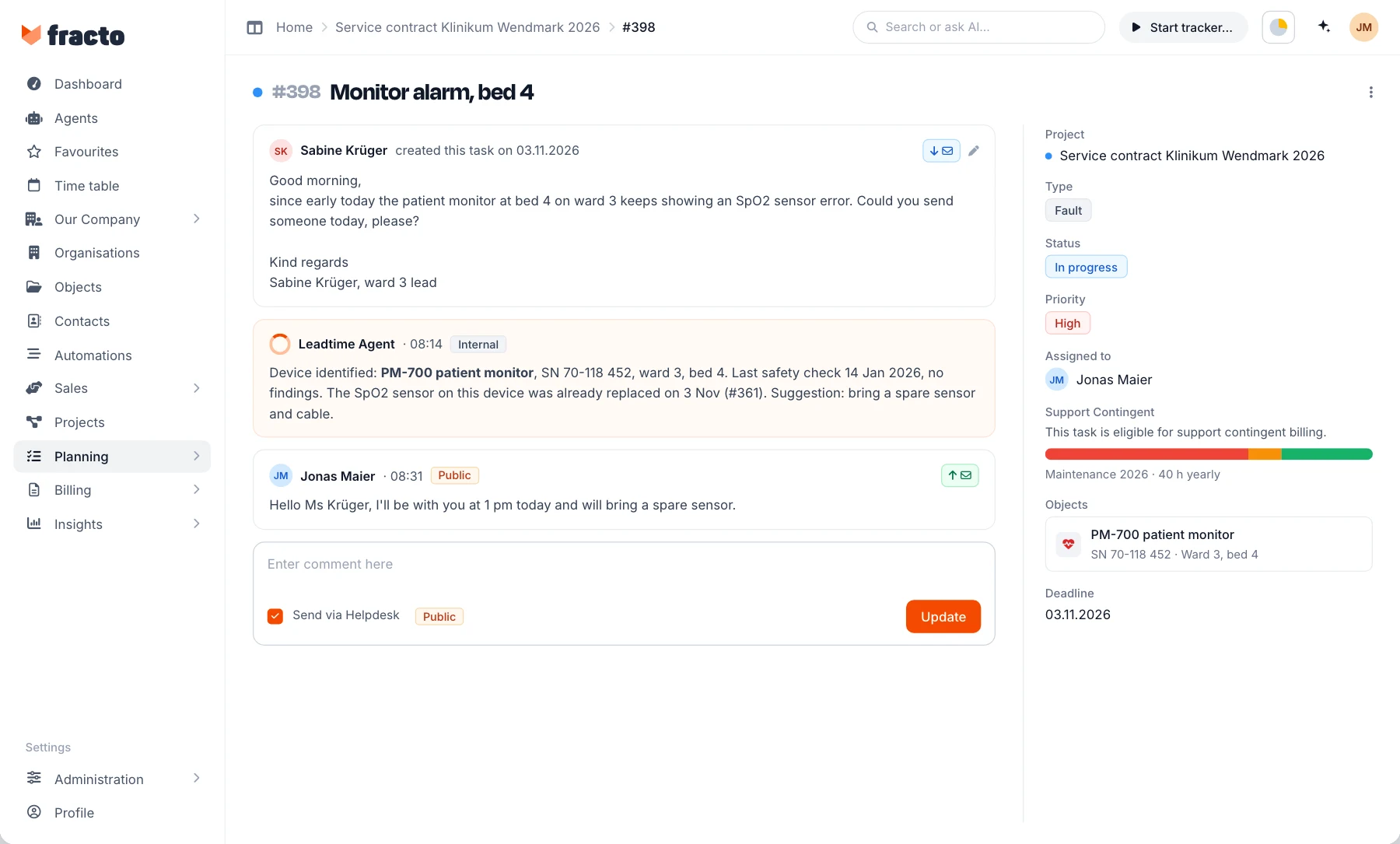
Now let's follow one job from start to finish. A hospital in Berlin reports a pressure-drop alarm on a ventilator during an operation. The report came by email, to the helpdesk address you set up for each customer. The email automatically became a task, in the right project, with the default status and priority. If you like, the sender gets a confirmation of receipt. The description holds the complete email, exactly as the hospital wrote it. On the right: project, type, status, priority and who is responsible. Plus your own fields for the job: location, start and end. You decide which fields each job type has. A repair needs different fields from a training session. And the agent has already assessed the report: it rated the urgency, suggested a technician from the region and estimated the effort. The result sits as a comment on the task. From the task, you create an express quotation in one click. The recipient is the contact at the customer, and the line item comes from the effort estimate. The quotation goes out by email as a PDF with your letterhead, and the customer accepts it via a link.
Scheduling technicians
Now the job needs a technician. Who is free, who is nearby? Dispatch often plans not only its own staff but also subcontractors, freelance technicians and temporary help for peak times. That means coordinating by email and phone, and it does not scale. In Fracto Field, every employee, permanent or freelance, connects their Google, Outlook or iCal calendar. Whatever is planned in the pipeline appears in their calendar automatically, with device, address, contact and time slot. The technician needs no extra app in the morning; the calendar on their phone is enough. The other way round, everything in their personal calendar shows up as blocked time in the pipeline: holidays, private appointments, a job for another client. So dispatch cannot double-book anyone by mistake. Planning happens in the pipeline. Technicians on the left, days along the top. Each bar is a scheduled job. There are three views: an overview for the week, a detailed view for planning by the hour, and a calendar for each technician. You drag jobs from the sidebar onto a free slot.
Field work and report
This is what a job looks like once it is done. The repair is complete, and the four hours are booked. The comment holds the technician's log with times: arrival, diagnosis, parts replaced, function test, handover. And this is the structured record: a repair report as a form, with fault description, diagnosis, parts replaced, function test, remaining defects and photos. You maintain the templates for these forms yourself, by drag and drop. Job done, hours booked.
Billing
Now to billing. Invoicing automatically collects every billable item, per customer and month: fixed fees, per-device billing, included packages and jobs outside the contract. Exactly the routine work that eats time today, and where mistakes get expensive. One click opens a draft with every line item. “Create invoice” turns it into the invoice: numbered in sequence, with your letterhead, tax rules and payment terms, as an e-invoice in ZUGFeRD or XRechnung format. Issued invoices land in receivables management. Here, for example, is the invoice that bills the repair together with the month's fixed fees. From here you send invoices, check incoming payments and send reminders when needed. That was the whole flow: contract, incoming job, dispatch, field work and billing. All in one place, in Fracto Field.

Photo: A head of service stands at his desk with a tablet and looks thoughtfully into the room.
Head of service at a medical device company
“Are all of this quarter’s inspections scheduled?”
How you see it in Fracto FieldHow Fracto Field solves it
From the device at the customer to the invoice, in one system.
Hospitals, devices and framework contracts are linked. Inspections and faults land in the same plan, and invoicing collects what is due per customer and month.
Devices
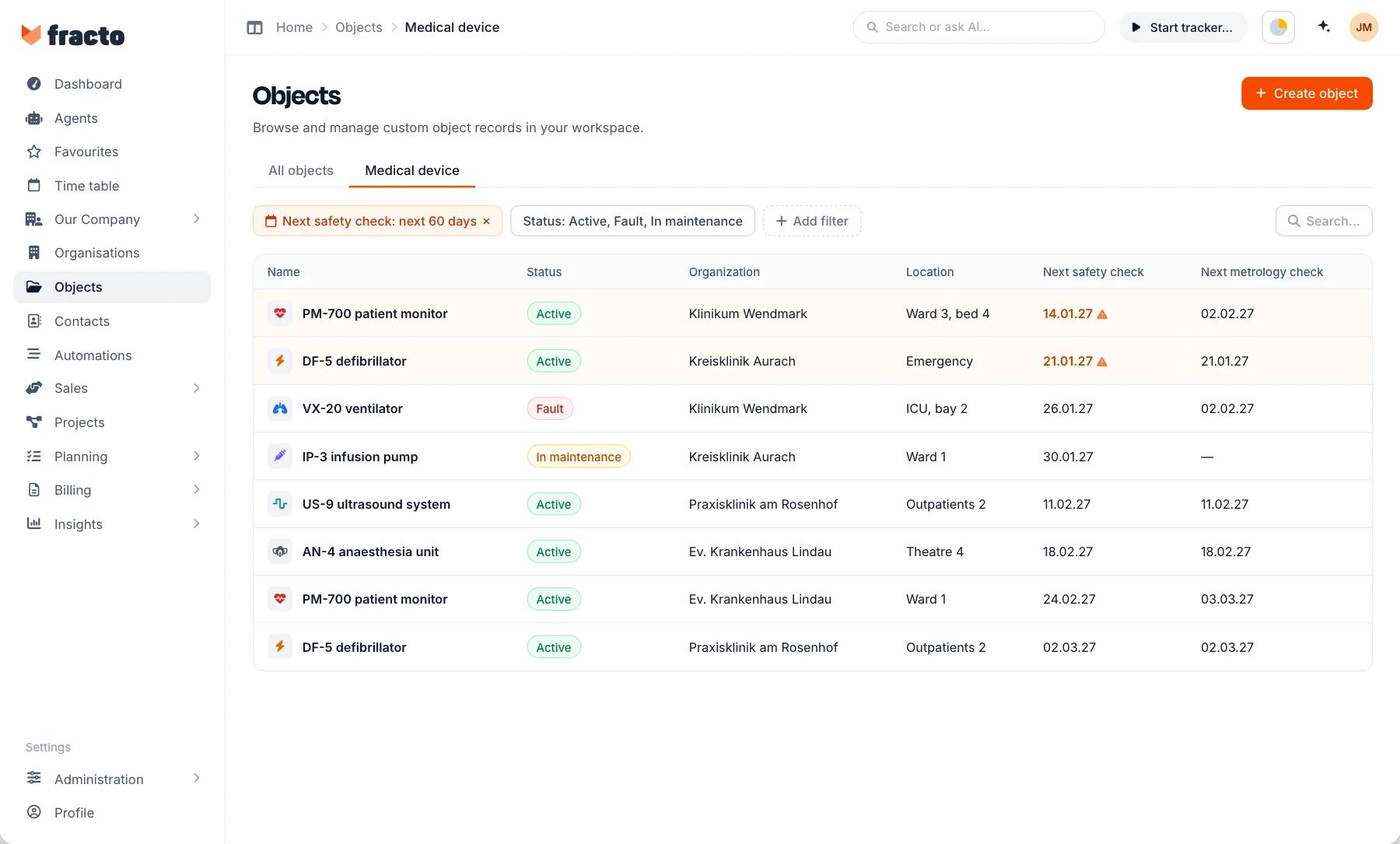
When the hospital calls, you see at once what last happened to the device.
The devices you service are objects in one list across all customers: with type, status, serial number and your own fields such as location, device class or the next safety check. Every task that ever ran on the device is attached to it, along with the journal and files such as test reports and manuals.
What you get: A saved view shows everything due in the next 60 days, and nobody keeps a spreadsheet of due dates of their own.
Service contracts
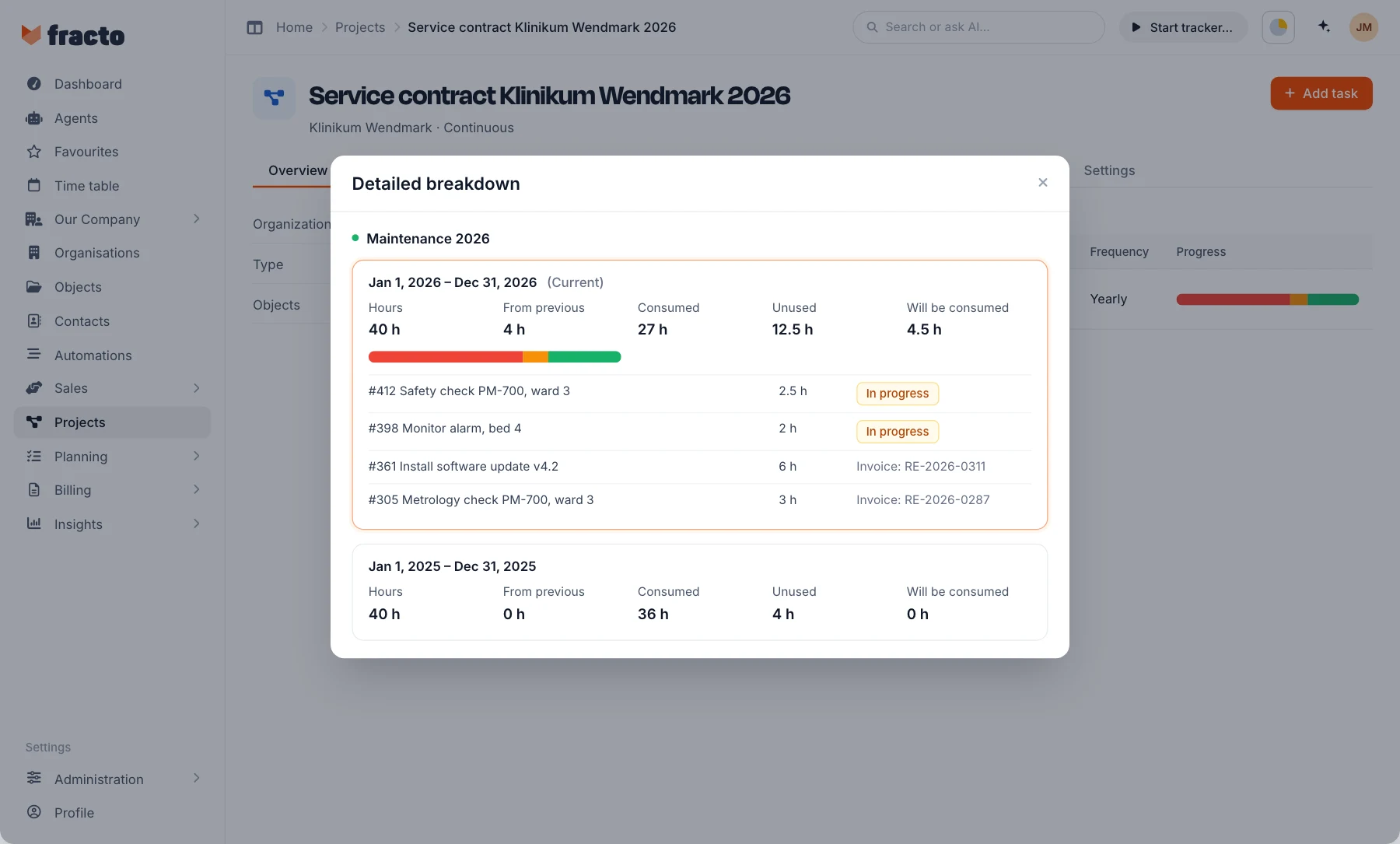
The contract shows what is used.
Framework contracts run as ongoing projects, with the devices, contacts and contract documents. Billing is a fixed fee, per serviced device or with included packages such as two safety checks a year. On top come support allowances: Fracto Field keeps track of how many hours are used, and unused hours can carry over to the next period.
What you get: When the installed base grows, the invoice grows with it, and nobody has to work out what is left of the allowance.
Faults and jobs
The ward’s email becomes a job on the right device.
Every customer gets a helpdesk address. The email becomes a task in the right project, with device, customer and contract, with an acknowledgement if you want one. The reply to the ward goes back from the same inbox. Scheduling happens in the pipeline, and every technician, staff or freelance, sees the job with device, address and contact in their Google, Outlook or iCal calendar.
What you get: Faults and inspections sit in one plan, everyone sees who is on it, and nobody gets double-booked.
Billing
The job becomes the invoice, without retyping.
Invoicing collects, per customer and month, what is due: fixed fees, per-device billing, included packages, allowances and jobs outside the contract. One click opens the draft with every item. The invoice goes out as an e-invoice in ZUGFeRD or XRechnung format.
What you get: Jobs outside the contract no longer slip through, and the invoice no longer waits for a retyped report.
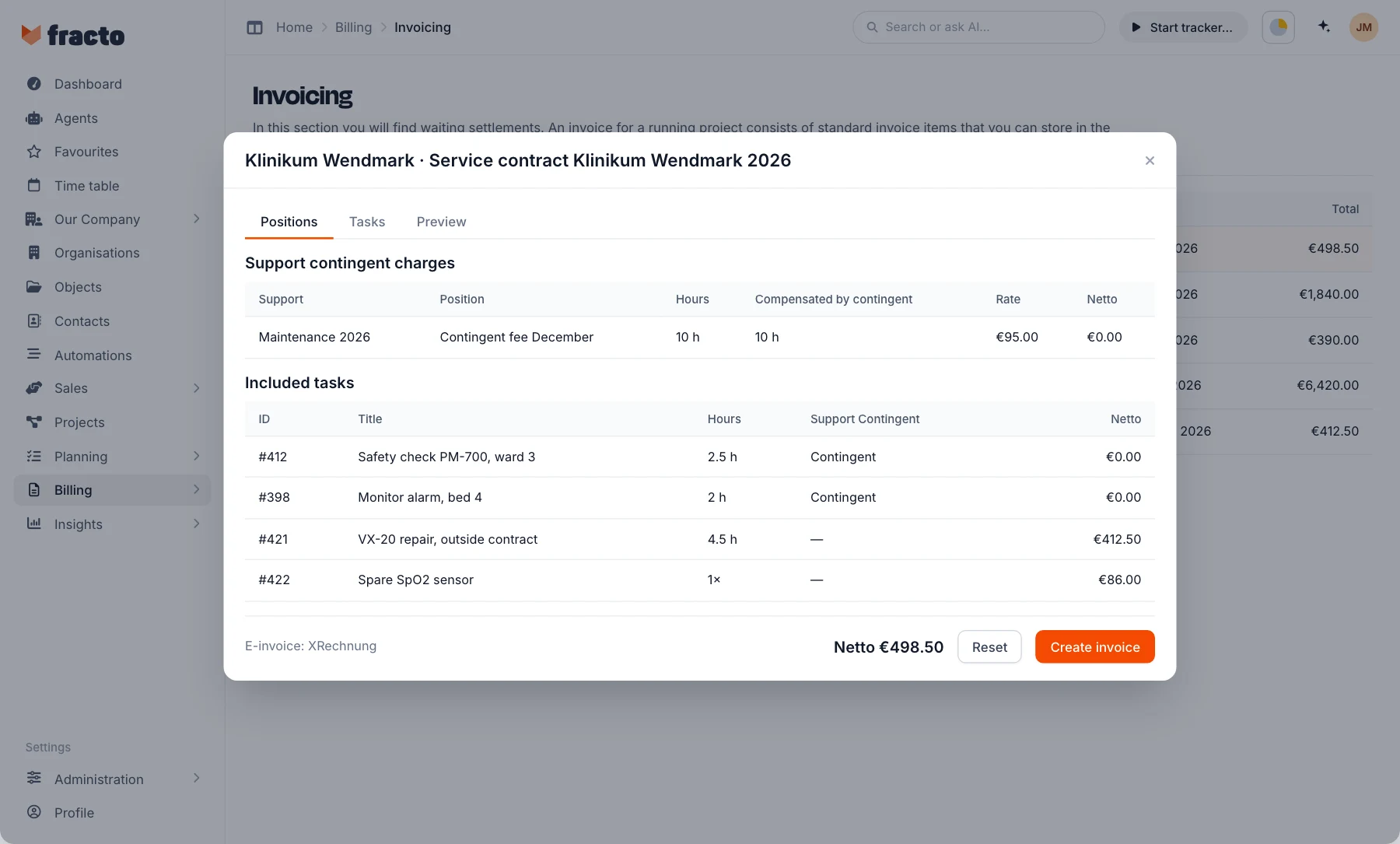

Photo: A nurse in navy scrubs is on the phone at the ward desk and looks to the side with a questioning face, a patient monitor behind her.
The agent
The agent creates due inspections. It sorts new faults.
An automation has a trigger, for example the first of every month at six o’clock. What the Leadtime Agent should do, you write in plain language: find all devices whose next safety check falls within the next 60 days, and create one task per device in the customer’s maintenance project.
When a fault comes in, the agent rates the urgency, suggests a technician from the region and estimates the effort. The result is posted as a comment on the task.
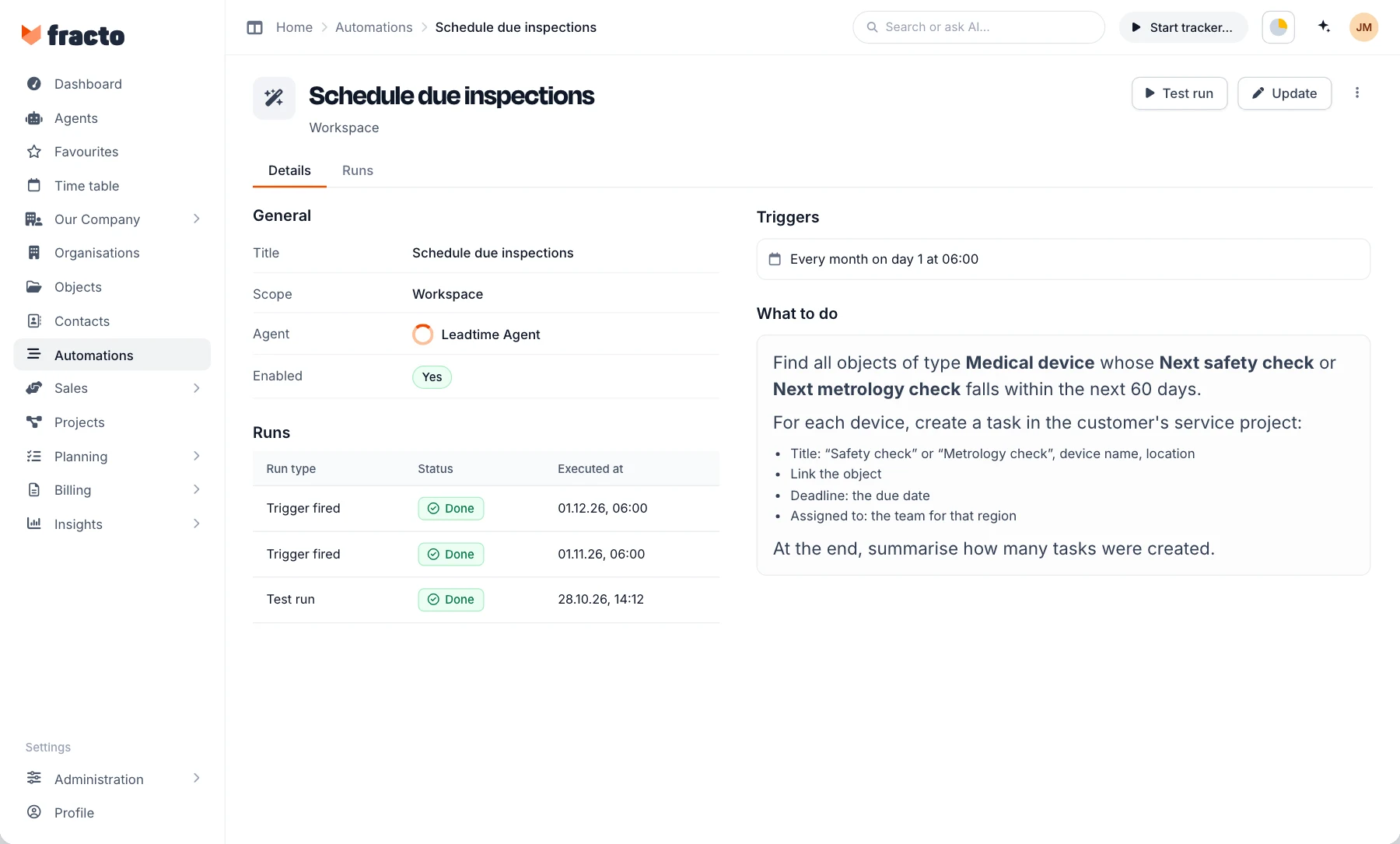
You set what each agent may do, and every run is logged. Before the first run you try the automation with a test run.
More about agentsNext step
Show us
your installed base.
Which devices do you service at which customers, and how do you plan today? The call is with Fracto, based on your own processes.